See every bill in the year, month by month.เห็นบิลทั้งปี ทีละเดือน
List your bills once: monthly ones, quarterly insurance, yearly car tax, a trip. The template adds up what's due each month and puts it next to your pay, so you see which months will be tight.ใส่บิลครั้งเดียว ทั้งรายเดือน ประกันรายไตรมาส ภาษีรถรายปี ทริปเที่ยว เทมเพลตจะรวมยอดที่ต้องจ่ายแต่ละเดือนแล้ววางคู่กับรายได้ ให้เห็นว่าเดือนไหนจะตึงมือ
- Works in Excel, Google Sheets and Numbersใช้ได้กับ Excel, Google Sheets และ Numbers
- English and Thai in one fileภาษาอังกฤษและไทยในไฟล์เดียว
- Red months show when bills are bigger than your incomeเดือนที่บิลมากกว่ารายได้จะเป็นสีแดง
- Your figures stay in your file. We never see them.ตัวเลขของคุณอยู่ในไฟล์ของคุณ เราไม่เห็น
Your template is readyเทมเพลตพร้อมแล้ว
Download it, then start with the Read me tab.ดาวน์โหลด แล้วเริ่มที่แท็บ Read me
Download the template (.xlsx)ดาวน์โหลดเทมเพลต (.xlsx)Google Sheets: upload the file to Google Drive, then open it with Google Sheets.Google Sheets: อัปโหลดไฟล์ไปที่ Google Drive แล้วเปิดด้วย Google Sheets
Your bills become your plan in one step, and Money shows how much to set aside each month so every bill is covered.บิลของคุณจะกลายเป็นแผนในขั้นตอนเดียว และ Money บอกว่าแต่ละเดือนต้องกันเงินไว้เท่าไรให้พอจ่ายทุกบิล
Import into Flowlytix Money →นำเข้า Flowlytix Money →The template shows which months are tight. Flowlytix Money shows how much to set aside each month so every bill is covered. Pro free for 30 days, no card needed.เทมเพลตบอกว่าเดือนไหนตึงมือ Flowlytix Money บอกว่าแต่ละเดือนต้องกันเงินไว้เท่าไรให้พอจ่ายทุกบิล ใช้ Pro ฟรี 30 วัน ไม่ต้องใช้บัตร
See Flowlytix Money →ดู Flowlytix Money →Bills in, a clear year out.ใส่บิล แล้วเห็นทั้งปีชัดเจน
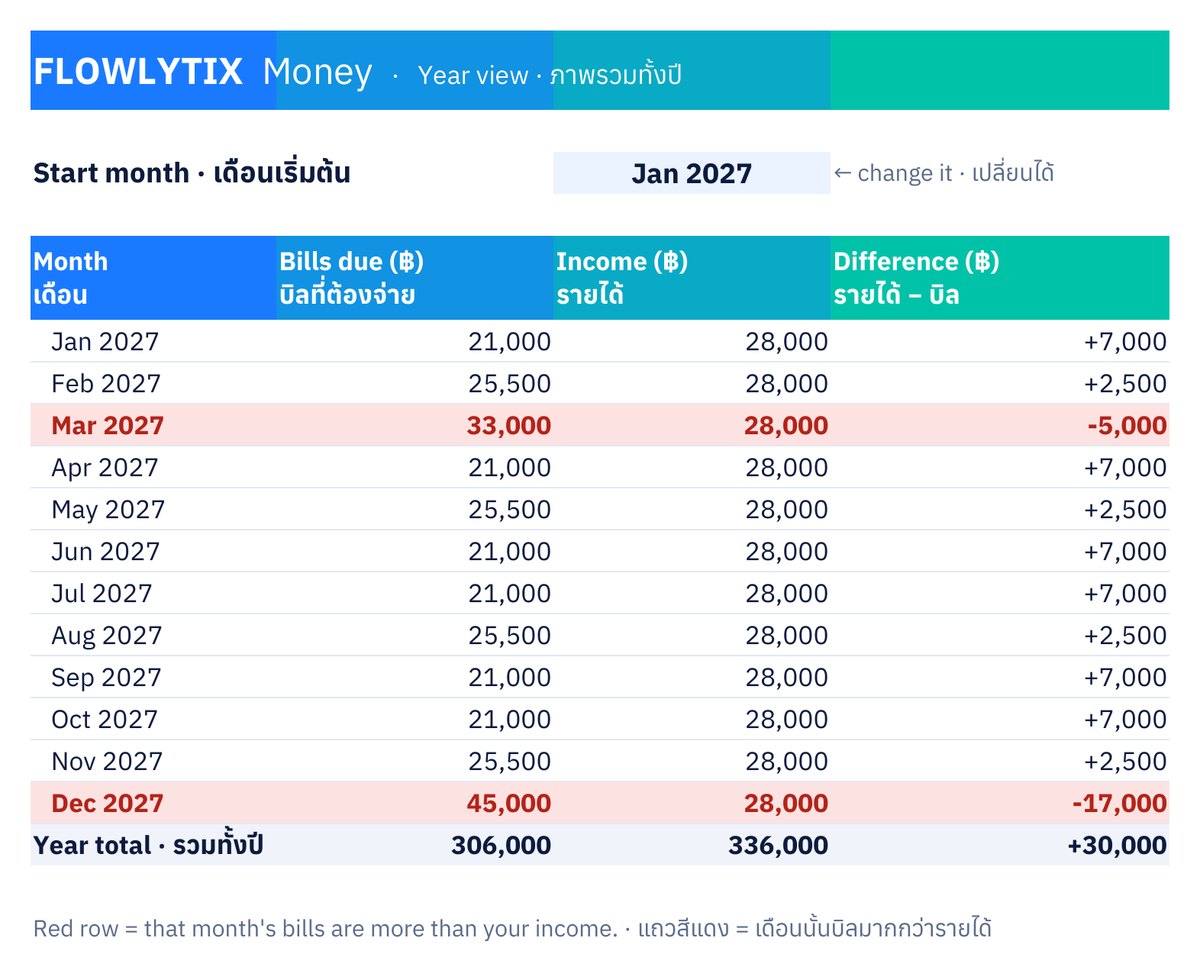
Year view, with the sample figures: in March (car insurance) and December (New Year trip) the bills are bigger than income.แท็บ Year view พร้อมตัวเลขตัวอย่าง: เดือนมีนาคม (ประกันรถ) และธันวาคม (ทริปปีใหม่) บิลมากกว่ารายได้
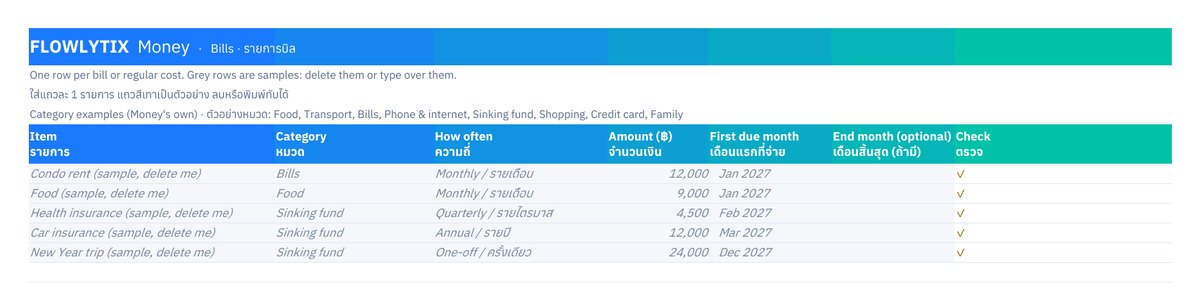
Bills tab: one row per bill. The grey rows are samples you delete or type over.แท็บ Bills: แถวละ 1 บิล แถวสีเทาเป็นตัวอย่างที่ลบหรือพิมพ์ทับได้
The template shows the tight months. Money fixes them.เทมเพลตบอกเดือนที่ตึงมือ Money ช่วยแก้
The free templateเทมเพลตฟรี
- Every bill in one listบิลทั้งหมดในรายการเดียว
- What's due each month, next to your payยอดที่ต้องจ่ายแต่ละเดือน เทียบกับรายได้
- Which months are redเดือนไหนเป็นสีแดง
Flowlytix Money
- How much to set aside each month, so red months are covered before they arriveแต่ละเดือนต้องกันเงินไว้เท่าไร ให้เดือนสีแดงมีเงินพอก่อนถึง
- Bills ahead: a warning months before a bill isn't coveredบิลที่ต้องจ่ายข้างหน้า: เตือนล่วงหน้าหลายเดือนก่อนบิลจะไม่พอจ่าย
- A quick month-end check-in, and your plan on every deviceสรุปสิ้นเดือนแบบรวดเร็ว และแผนของคุณบนทุกอุปกรณ์
- Your data stays in your own Google Driveข้อมูลอยู่ใน Google Drive ของคุณเอง
Questionsคำถามที่พบบ่อย
Is it really free?ฟรีจริงไหม?
Yes. The template is free to use and keep. No account and no card.ฟรีจริง ใช้และเก็บไว้ได้เลย ไม่ต้องสมัครบัญชีและไม่ต้องใช้บัตร
Can Flowlytix see what I type in it?Flowlytix เห็นสิ่งที่ฉันกรอกไหม?
No. The file lives on your computer or in your Google Drive. We only keep the email you give here.ไม่เห็น ไฟล์อยู่ในเครื่องหรือ Google Drive ของคุณ เราเก็บเฉพาะอีเมลที่คุณกรอกที่นี่
What do you do with my email?อีเมลของฉันจะถูกใช้ทำอะไร?
We keep it with the date and your language, to know who downloaded the template. We send news and tips only if you ticked the box. To be removed, email support@flowlytix.co.เราเก็บไว้พร้อมวันที่และภาษาที่คุณใช้ เพื่อรู้ว่าใครดาวน์โหลดเทมเพลต เราจะส่งข่าวสารและเคล็ดลับเฉพาะเมื่อคุณติ๊กช่องไว้ หากต้องการให้ลบ ส่งอีเมลมาที่ support@flowlytix.co
Does it work on a phone?ใช้บนมือถือได้ไหม?
Yes, in the Google Sheets or Excel app, though a computer is easier for typing your bills the first time.ได้ ผ่านแอป Google Sheets หรือ Excel แต่การกรอกบิลครั้งแรกบนคอมพิวเตอร์จะง่ายกว่า